Mar 2, 2008
Have you ever tried these hidden commands in the address bar of your Firefox.If not,then try it..
about:
A simple prompt without any parameter will display the Mozilla “about”
information. Since it’s accessible from the top menus as well, it’s not
quite a hidden feature.
about:buildconfig Obviously, it will show the build platform configuration and parameters
 about:cache
Will display info and statistics regarding your disk’s cache, including
the name of your cache’s directory and a list of the entries you can
find there. By default, Firefox doesn’t allow you to view the cached
webpages, so this can be an useful option.
about:config
Oh look, many many info. Indeed, it’s the most complex and meaningful
of them all. Careful on what you plan to change here, your browser
won’t run properly after if you play with the wrong things.
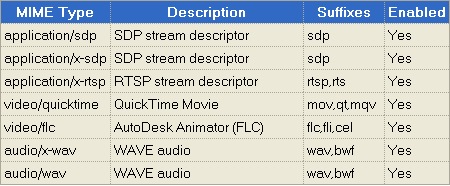
about:plugins
Of course, what is Firefox without it’s powerful extensions? This
option will display detailed information about all the plugins
installed for Mozilla Firefox.
about:credits
It’s time to give the credit to whoever deserves it. There’s an
alphabetically sorted list of all the people that gave their
contribution to the development of Firefox.
about:Mozilla
This is a weird thing. It will display the so-called “Book of Mozilla”.
Something similar was present in Netscape too. There’s actually no real
book although the quotations might give you that impression.

If you have other similar tricks then don't hesitate to comment here.
Have your USB drives become corrupt or
deleted your files or formatted your USB Pen drives accidentally
without knowing and thought that all the files in the drive are gone
forever.But in the actual case the file is still alive and it’s
recoverable only if the disk hasn’t been overwritten.Only the pointer
to that file is being actually deleted and the windows thinks that
there is an empty space and writes over them.When a file is deleted, it
is removed from the file system. However, the actual data is not
erased.Sometimes after unsafe eject of your USB drives it might show
that "Drive not formatted.Format it now".Doing so will destroy all your data that moment itself and you are forced to recover that deleted files.
According
to Lexar tech support, there is a bug with Windows 2000 (that MS never
bothered to fix) and can corrupt the drive when it is removed without
proper eject. They recommend EasyRecovery Pro for data recovery which
did allow me to recover some files (> 500) using their RAW data
recovery program (all other tool failed because usually said "no
recognizable file on disc").
See how Linux could save your data from a corrupt USB hard drive at LinuxJournal:How a Corrupted USB Drive Was Saved by GNU/Linux
CD/DVD Data recovery
CD/DVD
Data Recovery is an easy-to-use tool to recover corrupted file from CD
and DVD, It fast scans disk sectors, rescues the damaged files and
copies the correct data to hard disk as possible as it can. The program
is especially effective for corrupted digital multimedia files, audio,
video, image files, MPEG, AVI, RM, MP3, JPEG etc, and for damaged
document and text files. It supports many types of optical disk such as
CD-ROM, CD-R, CD-RW, DVD-ROM, DVD-R, DVD-RW and file systems such as
ISO9660 and UDF.
Download click here CopyDown
Undelete Plus (recover files from memory cards and usb drives)
Undelete
Plus is a quick and effective way to retrieve accidentally deleted
files, files removed from the Recycle Bin, in a DOS window, from a
network drive, from Windows Explorer with the SHIFT key held down.The
program supports all Windows file systems for hard and floppy drives
including FAT12/16/32,NTFS/NTFS5 and image recovery from CompactFlash,
SmartMedia, MultiMedia and Secure Digital cards.
Recuva Freeware
Recuva.exe
is only 180KB and it doesn’t require any other DLL files. You can copy
recuva.exe to your thumb drive and run it from there.
The
inteface is very simple without any settings needed. Just select the
drive that you want to scan and click on the Scan button.(referer
raymond blog)
With the release of Windows Vista, Microsoft has
introduced a new technology called ReadyBoost. With the help of this
technology one can use any Flash drive, SD Cards, CF Cards as the third
memory option for the computer.
Now, the benefits of Flash Drive or Cards as a source of Memory :
1. It is faster than the virtual memory which is accessed through the hard disk drive.
2. It is cheaper as compared to the actually Physical Memory.
How can it be activated ?
In order to activate the ReadyBoost technology on your FlashDrive or Memory Cards, you have to follow these steps…
1. Open My Computer.
2. Right Click on the Removable Disk Drive and select Properties.
3. Click on ReadyBoost Tab.
4. Enable the feature by selecting the option and allocate the amount of space you want to use as memory.
Things to be noted….
1. Regardless of the fact that you use Readyboost or not, you need at least 512 Mb of memory to run Windows Vista decently.
2.
If your device is not giving the option of ReadyBoost then it means
that it doesn’t clear up the minimum data trasfer rate required by
ReadBoost technology.
FLV to AVI Converter is the freeware application which convert Flash
Video files (FLV, SWF) into AVI or MPG (MPEG-1, MPEG-2).
FLV files are not supported by Windows Media Player and other popular
media players. To display FLV video you need to convert that file into
more reliable format, such as AVI or MPG. The application allows you to
set many parameters used by encoder: audio and video codec, audio and
video bitrate, fps, sampling frequency, resolution and other.
The Pazera Free FLV to AVI Converter interface is a very simple and
user-friendly. To convert flash video files, just drag & drop them
into main window and click CONVERT button.
- Conversion FLV and SWF to AVI or MPG.
- Supported video codecs: XviD, DivX 3, H.264, WMV, MPEG4-FFmpeg, S-Mpeg 4 v. 2, Motion JPEG (MJPEG).
- Supported audio codecs: Lame (MP3), MP2, AC3, AAC, WMA.
- Generating video files compatible with the MPEG-1 / MPEG-2 standard.
- Decoding the most important audio and video codecs used in FLV
files: Flash/Sorenson, H.264, MPEG-1 Layer 3 (MP3), MPEG-2.5 Layer 3,
ADPCM, AAC etc. - 2-pass encoding which will improve the video qaulity.
- Don't need any installation. Just extract ZIP archive and click flvtoavi.exe.
- Portability. This program can be run from portable devices.
- Supported languages: english, polish.
- 100% freeware! - for commercial and non-commercial use. No adware, no spyware.

| Click Here to download from Copydown server |
Mar 1, 2008
allows you to send them to another person without having a player and
codec. In addition to this primary function, Audio/ Video To EXE also
performs conversions between various media formats.
There are two types of conversion offered - EXE and multimedia
formats, with a list of tasks and completed quickly. The only drawback
of this free version is that you cannot select the sampling frequency
and hence the quality of the resulting files. This is a great tool for
sending small videos and songs by e-mail, ensuring that the recipient
can play the file. Almost all audio/video formats [3GP, AAC, AC3, AIFF,
ASF, AVI, EXE, FLAC, FLV, GIF, M1V, M2V, M4V, MOV, MP2, MP3, MP4, MPC,
MPG, NUT, OGG, RA, RM, SWF, VOB, VOC, WAV, WMA, WMV, WV, YUV] are
supported. You can even play and convert your executables without a
player or a codec. It works as a standalone and the latest version adds
M1V, M2V, M4V, and YUV support.
If you love to share clips with someone who's forever having
problems with their media player, then Audio/Video to EXE is the answer
to your prayers.
 |  |  |  |
Supported formats
3gp, aac, ac3, aiff, au, avi, asf, exe, flac, flv, gif, mov, m1v, m2v, m4v, mp2, mp3, mp4, mpc,
mpg, nut, ogg, ra, rm, swf, vob, voc, wav, wma, wmv, wv y yuv
Download From Copydown